S2 Module
Active
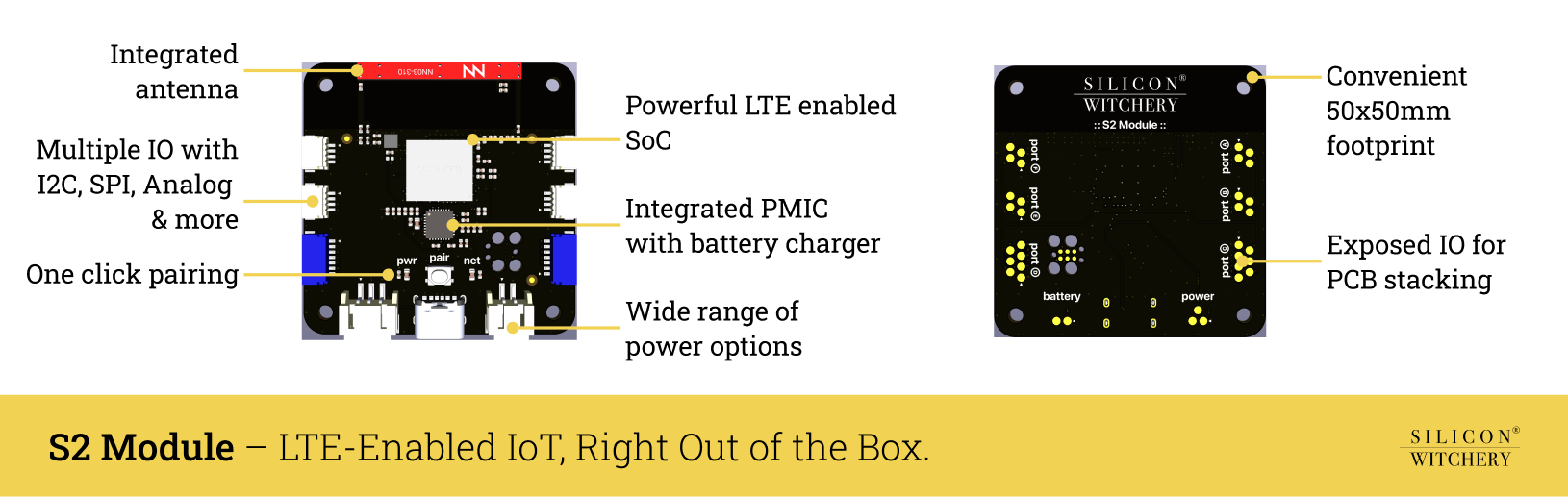
The S2 is a cellular IoT module built around the Nordic nRF9151, an ARM system in package with LTE Cat-M1 and GNSS. It has SPI, I2C, analog and digital IO, and power management with battery charging. Every S2 has a SoftSIM and a data plan built in. It runs Lua code that you upload over cellular with Superstack, so you need no debugger or local toolchain.
Get started Lua reference Example code Agent plugin
Feature summary
Hardware
- ARM SiP with integrated LTE Cat-M1 and GNSS
- Built-in antenna supporting major LTE bands
- Multiple I/O: SPI, I2C, analog inputs, GPIO
- Advanced power management with battery charging
- Multiple power inputs with low power modes
Connectivity
- SoftSIM built in, with LTE-M in the countries listed below
- Data plan included, with no contract
- Pairs with a fleet by its IMEI and a press of its pairing button
- Variant with external antenna connectors
Development
- Runs Lua code uploaded over cellular
- Sends its log over cellular
- Installs firmware updates automatically
- No debugger or local toolchain needed
Use cases
Industrial & Manufacturing
- Remote equipment monitoring and predictive maintenance
- Environmental monitoring in factories
- Production line automation and monitoring
Smart Agriculture
- Crop monitoring and automated irrigation
- Livestock tracking and health monitoring
- Weather station networks
Smart Cities & Infrastructure
- Energy consumption optimization
- Environmental sensing networks
- Waste management optimization
- Occupancy monitoring
- Traffic flow monitoring
Supply Chain & Logistics
- Cold chain monitoring
- Asset tracking and management
- Warehouse automation
- Fleet tracking and diagnostics
Contents
- Block diagram
- Pinout
- Status LEDs & button
- LTE & GNSS connectivity
- Power & battery interface
- Programming
- Schematic
- Characteristics
- Housing & mounting
- Labeling
- Mechanical dimensions
- Ordering information
- Compliance
- Terms of purchase
- Let us build it for you
Block diagram
The S2 Module features two key devices:
- ARM Cortex-M33 System in Package with Cellular & GNSS - Nordic nRF9151
- Power management IC with switching regulation & battery charging - Nordic nPM1300
The module includes all supporting circuitry such that no external hardware except a simple power source is needed to operate the device.
The device exposes a range of I/O that can be used to connect external devices and features smart power management to run off either external power or a single-cell lithium polymer battery, saving power whenever possible.
A single button is included for easy setup and two status LEDs indicate network and power status at a glance.
The integrated antenna covers the LTE and GPS bands listed in LTE & GNSS connectivity. A variant with external antenna connectors is available for designs where the built-in antenna is not suitable.
Pinout
The S2 Module features six IO ports and three power ports. Digital IO is freely configurable across all ports, while analog inputs are limited to certain pins. A detailed description of all the pins is shown in the diagram below.
The bottom of the module additionally exposes the same IO as the physical connectors such that the board can be mounted to a carrier PCB and electrically interfaced via pogo-pins. See the section on mechanical dimensions for a recommended landing pattern.
The table below summarizes all ports and pins. Pin 1 of every IO port is GND, and pin 2 is the port’s power rail. The pin names shown are the exact strings used in Lua code.
| Port | Connector | Power rail | IO pins (connector pin №) | Analog capable |
|---|---|---|---|---|
| PORTA | 4-pin | VOUT1 | A0 (3), A1 (4) | - |
| PORTB | 4-pin | VOUT1 | B0 (3), B1 (4) | - |
| PORTC | 7-pin | VOUT1 | C0 (3), C1 (4), C2 (5), C3 (6), C4 (7) | C2, C3, C4 |
| PORTD | 7-pin | VOUT2 | D0 (3), D1 (4), D2 (5), D3 (6), D4 (7) | D0, D1, D2, D3, D4 |
| PORTE | 4-pin | VOUT2 | E0 (3), E1 (4) | - |
| PORTF | 4-pin | VOUT2 | F0 (3), F1 (4) | - |
| Power connector | Pins |
|---|---|
| Power Port | 1: VSYS, 2: VIN, 3: GND |
| Battery Port | 1: VBATT, 2: GND |
The 4-pin ports follow the Stemma QT/Qwiic pin order, where pin 3 carries SDA and pin 4 carries SCL when used for I2C.
Status LEDs & button
The button is the pairing button. It does nothing except pair the module with a fleet, so someone with access to the module in the field can’t change what it does. To move the module to another fleet, unpair it with the Superstack CLI, then pair it again and press the button.
The status LEDs, meanwhile, indicate the networking and power status of the device throughout the lifetime of the application.
The table below describes each of the LED states.
Both LEDs on means the module is starting or applying a firmware update. This lasts a moment.
| Power LED | Meaning |
|---|---|
| Short blinks ▁▇▁▁▁▁▁▁▁▁▇▁▁▁ | Running on battery power – No external power detected |
| Slow blinking ▇▇▇▇▁▁▁▁▇▇▇▇▁▁ | Battery charging |
| Solid ▇▇▇▇▇▇▇▇▇▇▇▇▇▇ | Battery charged |
| Short blanks ▇▇▇▁▇▇▇▇▇▇▇▇▁▇ | Running on external power – Battery absent or not charging |
| Network LED | Meaning |
|---|---|
| Slow blinking ▇▇▇▇▁▁▁▁▇▇▇▇▁▁ | Searching for LTE network |
| Solid ▇▇▇▇▇▇▇▇▇▇▇▇▇▇ | Connected to the network – Not paired with a fleet |
| Fast blinking ▇▇▁▁▇▇▁▁▇▇▁▁▇▇ | Pairing button pressed – Pairing with a fleet |
| Off ▁▁▁▁▁▁▁▁▁▁▁▁▁▁ | Paired & idle |
| Short blinks ▁▇▁▁▁▁▁▁▁▁▇▁▁▁ | Data transmission |
| Strobe ▁▇▁▇▁▇▁▇▁▇▁▇▁▇ | Firmware updating Do not power off |
Automatic firmware updates
Silicon Witchery releases firmware updates for the S2 Module. The module installs them automatically, with no action from you.
An update takes several minutes:
- The network status LED strobes while the module downloads the update. The code keeps running.
- The module restarts to install it.
- The module reconnects, and the code starts again from the beginning.
The module updates its modem firmware one version at a time, then its own firmware, so a module that is several versions behind repeats these steps. Keep the module powered until the network status LED blinks slowly while the module reconnects, and then turns off, or stays on for an unpaired module. Removing power during a download makes the download start again.
A module checks in with Superstack every 15 minutes, and when Superstack asks it to, such as after an upload. A new version of the module’s own firmware that can’t check in for 50 minutes is removed, and the module returns to the version it had before.
LTE & GNSS connectivity
The S2 Module ships with LTE Cat-M1 enabled with support for the following bands: 1, 2, 3, 4, 5, 8, 18, 19, 20, 25, 26, 65, and 66. All of which are supported by the integrated antenna. Additionally, the external antenna variant of the module supports the following bands: 12, 13, 17, 28, and 85.
Each module has a SoftSIM and a data plan built in. Data is paid for with the credit on the module’s fleet.
The following countries are included in the data plan, with more added regularly. The list follows Onomondo’s network list of 13 October 2026.
| Country | Connected | Country | Connected soon |
|---|---|---|---|
| Austria | ✅ | Argentina | Validated 📶 |
| Belgium | ✅ | Australia | Validated 📶 |
| Colombia | ✅ | Canada | Validated 📶 |
| Costa Rica | ✅ | Chile | Validated |
| Denmark | ✅ | Croatia | Validated |
| Finland | ✅ | Czechia | Validated |
| France | ✅ | Dominican Republic | Validated |
| Germany | ✅ | Ecuador | Validated |
| Iceland | 📶 | Estonia | Validated |
| Japan | ✅ | Faroe Islands | Validated |
| Latvia | ✅ | Greece | Validated |
| Liechtenstein | ✅ | Hungary | Validated |
| Luxembourg | ✅ | Ireland | Validated |
| Malta | ✅ | Jamaica | Validated |
| Mexico | ✅ | Lithuania | Validated |
| Netherlands | ✅ | Portugal | Validated |
| New Zealand | 📶 | Puerto Rico | Validated |
| Norway | ✅ | Saudi Arabia | Validated |
| Poland | ✅ | South Korea | Validated |
| Romania | ✅ | Thailand | Validated |
| Singapore | ✅ | ||
| Slovakia | ✅ | ||
| Slovenia | ✅ | ||
| Spain | ✅ | ||
| Sweden | ✅ | ||
| Switzerland | ✅ | ||
| Taiwan | ✅ | ||
| Turkey | ✅ | ||
| United Kingdom | ✅ | ||
| United States | 📶 | ||
| Uruguay | 📶 |
📶 - Buy the external antenna variant for this country. Its networks carry LTE-M on the 700 MHz bands 12, 13, 17 or 28, which the integrated antenna doesn’t cover. In the United States and New Zealand the cities also have LTE-M on higher bands, so the integrated antenna works there but not in the countryside.
A country joins this table once all of it has LTE-M coverage. Many more countries, such as Italy, already have LTE-M in cities but not everywhere, so test one module at the site before you deploy a fleet there. Brazil and Israel have LTE-M networks, but their data costs many times more, so the S2 doesn’t support them. If your country isn’t listed, email info@siliconwitchery.com before you deploy.
The module also supports GPS L1 C/A and QZSS L1 C/A reception with a maximum accuracy of 2.0m in continuous tracking mode, or 3.4m in periodic tracking mode.
Antenna considerations
The S2 Module features an integrated multi-band antenna supporting all the LTE and GPS bands mentioned above. To ensure optimal performance of the antennas, the antenna area must be kept clear of metal objects, and the module must not be placed inside an enclosed metal area.
For optimum GPS accuracy, the antenna should have line of sight to open sky.
External antenna variant
If the mounting requirements for the module within an installation make it difficult for the integrated antenna to receive good reception, then a variant of the module is available with external antenna connectors. This variant allows the module to be placed inside metal enclosures with antenna routed outside to achieve better reception.
A wide variety of external antennas are available from various manufacturers. LTE antennas should support 698-960MHz and 1745-2200MHz with a VSWR of 3 or better. GPS antennas should support 1575MHz with a VSWR of 2 or better.
Examples of external antennas are listed below:
Power & battery interface
The S2 Module features an extensive power management solution built in. It can be powered in a variety of ways, includes lithium battery charging capabilities, as well as outputting multiple voltages to power sensors or other low power electronics. Additionally, the power management ensures low power operation of the module, saving power whenever possible.
Power inputs
The S2 Module features three options for input power:
- Standard 5V USB-C input – VUSB
- External 5 - 17VDC input – VIN
- Single lithium polymer cell – VBATT
The USB-C input takes 5V, and the module draws up to 1.5A from it.
The external power port allows powering of the module from a DC voltage between 5 and 17V. Up to 1A may be drawn.
Finally, power can also be provided via a single lithium polymer cell. Further details on cell specifications are shown in the battery charging section below, as well as the electrical characteristic tables.
Power outputs
The module has two voltage outputs which can be used for powering external sensors or components. VOUT1 and VOUT2 are adjustable, while VSYS is fixed.
| Rail | Exposed on | Max current draw | Adjustable voltage output |
|---|---|---|---|
| VOUT1 | PORTA, PORTB, PORTC | 100mA across all ports | Off or 1.8 - 3.3V * |
| VOUT2 | PORTD, PORTE, PORTF | 100mA across all ports | Off or 1.8 - 3.3V * |
| VSYS | External Power Port | 1A ⁑ | 5V |
* – **VOUT1** and **VOUT2** come from the same internal source, so they always have the same voltage. [`device.power.set_vout()`](/pages/superstack/lua#set-the-io-voltage-for-all-ports) sets both, and `0` turns both off.
⁑ – VSYS is a 5V regulated output which powers everything on the module including VOUT1, VOUT2, the radio and battery charging. Its current capability is therefore highly dependent on what else is being powered. Assuming a suitable power input to one of the input ports, VSYS is capable of providing up to 1A of current.
Battery charger
The module features charging from a single lithium cell at a configurable current from 32mA to 800mA. The charge termination voltage can be set to 3.50, 3.55, 3.60 or 3.65V, or from 4.00 to 4.45V in 50mV steps. At boot, the charger uses 3.50V and 32mA until the code sets it with device.power.battery.set_charger_cv_cc(). Higher capacity cells may be used, but will result in slower charge times.
On battery, the module draws at most 200mA from the cell while the charge current is 150mA or less, which includes the boot default. Above 150mA, it can draw up to 1A. Set a charge current above 150mA if the sensors and radio together need more than 200mA on battery.
The module features thermal regulation such that if the ambient temperature is too high to safely charge the battery, the PMIC will throttle the charge current to prevent damaging the cell. To ensure this feature works as expected, the cell must be placed against the module, and the designer should ensure to minimize any temperature differential between the cell and the module.
Programming
The S2 Module comes programmed with the Superstack firmware and a SoftSIM with a data plan. You don’t program it directly. Instead, you upload Lua code to it over cellular with Superstack, as the getting started guide shows.
You can erase the module and load your own firmware. This also erases the SoftSIM and the module’s Superstack identity, so the module can no longer use the data plan or Superstack.
The S2 Module is compatible with Tag-Connect TC2030-CTX programming cables, which can be used in conjunction with Segger J-Link debug probes for firmware development and debugging.
Schematic
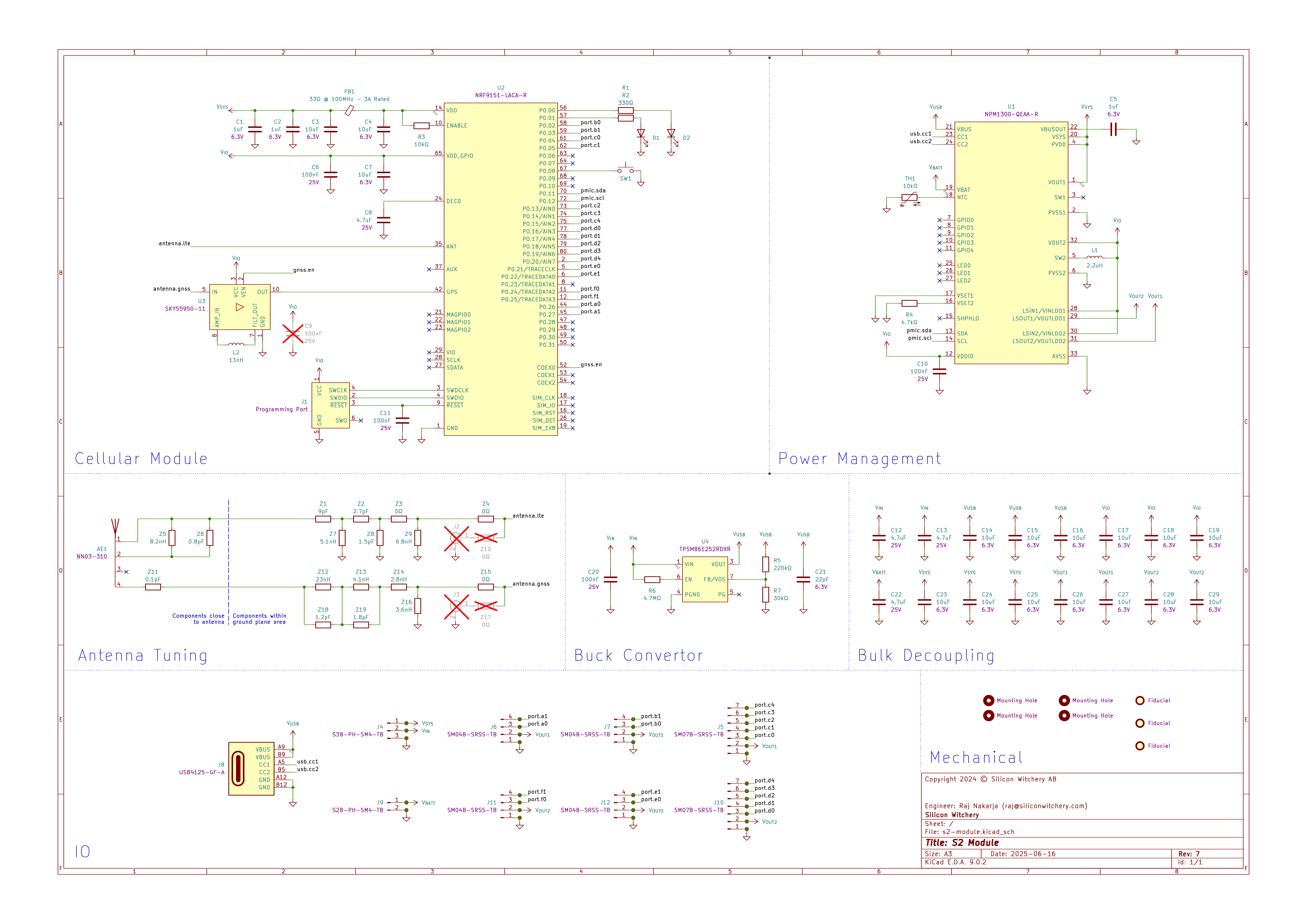
The full schematic of the S2 Module is shown in the diagram below.
Characteristics
Ratings and characteristics of the module are listed below. For further details, the datasheets of the internal components may be referenced according to the schematic.
Absolute maximum ratings
| Description | Min | Max |
|---|---|---|
| USB input voltage: VUSB | -0.3V | 22V |
| External input voltage: VIN | -0.3V | 19V |
| Battery input voltage: VBATT | -0.3V | 5.5V |
| Output rail voltages: VSYS, VOUT1, VOUT2 | -0.3V | 5.5V |
| PORTA - PORTF IO voltages: | -0.3V | VOUTx + 0.3V |
| LTE port RF input level* | - | 10dBm |
| LTE port maximum mismatch from 50Ω* | - | VSWR of 10:1 |
| GPS port RF input level* | - | 10dBm |
| Storage temperature | -40°C | 95°C |
- – External antenna variant only
Recommended operating conditions
| Description | Min | Max |
|---|---|---|
| USB input voltage: VUSB | 4V | 5.5V |
| External input voltage: VIN | 5V | 17V |
| Battery input voltage: VBATT | 2.3V | 4.45V |
| Operating temperature | -40°C | 85°C |
Electrical characteristics
| Description | Min | Typ | Max |
|---|---|---|---|
| USB overvoltage protection threshold | - | 5.5V | - |
| USB power-on reset release voltage | - | 3.9V | - |
| USB brown-out trigger voltage with VBATT not present | - | 3.8V | - |
| USB brown-out trigger voltage with VBATT present | - | 3.6V | - |
| USB input current draw: IUSB | 1.8mA | - | 1.5A |
| Resistance between VUSB and VSYS | - | 300mΩ | - |
| External input current draw: IIN | 1mA | - | 1A |
| Battery power-on reset release voltage | - | 2.75V | - |
| Battery brown-out trigger voltage | - | 2.4V | - |
| Minimum VBATT voltage for charging | - | 2.1V | - |
| Range of battery charging termination voltage | 3.50V 4.00V | 50mV steps | 3.65V 4.45V |
| Range of battery charging constant current | 32mA | 2mA steps | 800mA |
| Range of battery discharge current limit | 200mA | - | 1A |
| Resistance between VBATT and VSYS | - | 160mΩ | - |
| Battery charger temperature accuracy | - | 2°C | - |
| Trickle charge timeout | - | 10min | - |
| Charging timeout in CC or CV mode | - | 7h | - |
RF characteristics
| Description | Min | Typ | Max |
|---|---|---|---|
| Supported LTE standard | - | LTE Rel-14 Cat-M1 HD-FDD | - |
| Supported LTE bands | - | B1, B2, B3, B4, B5, B8, B12, B13, B17, B18, B19, B20, B25, B26, B28, B65, B66, B85 | - |
| LTE transmission bandwidth | - | 1.4MHz | - |
| LTE RX frequency range | 728MHz | - | 2200MHz |
| LTE RX sensitivity low band | -103dBm | -108dBm | - |
| LTE RX sensitivity high band | -103dBm | -107dBm | - |
| LTE TX frequency range | 698MHz | - | 1980MHz |
| LTE TX power output | -40dBm | - | Power class 3: 23dBm Power class 5: 20dBm |
| LTE port impedance⁑ | - | 50Ω | - |
| GPS sensitivity | TBD | - | TBD |
| GPS time to first fix | 1.3s | - | 30.5s |
| GPS accuracy | 1.8m | - | 3.1m |
| GPS port impedance⁑ | - | 50Ω | - |
⁑ – External antenna variant only
Housing & mounting
Both variants of the module ships with a plastic housing, as well as a set of nylon screws and standoffs for easy mounting.
- 1x plastic housing
- 4x 12mm M2.5 countersunk screws
- 4x 6mm M2.5 hex standoffs
- 4x 4mm M2.5 pan head screws
The module may be mounted to either a chassis, or a host PCB. If using the internal antenna variant of the module, ensure that there are no metal objects close to the antenna.
If mounted to a PCB, it is possible to interface with all of the module power and IO connections using spring loaded pogo pins which press against the gold pads on the bottom of the module. If using the included 6mm standoffs, the following pogo pins are suitable:
Labeling
The position of the pre-attached IMEI label is shown below. The label displays the IMEI in both text and QR code format as shown:
Mechanical dimensions
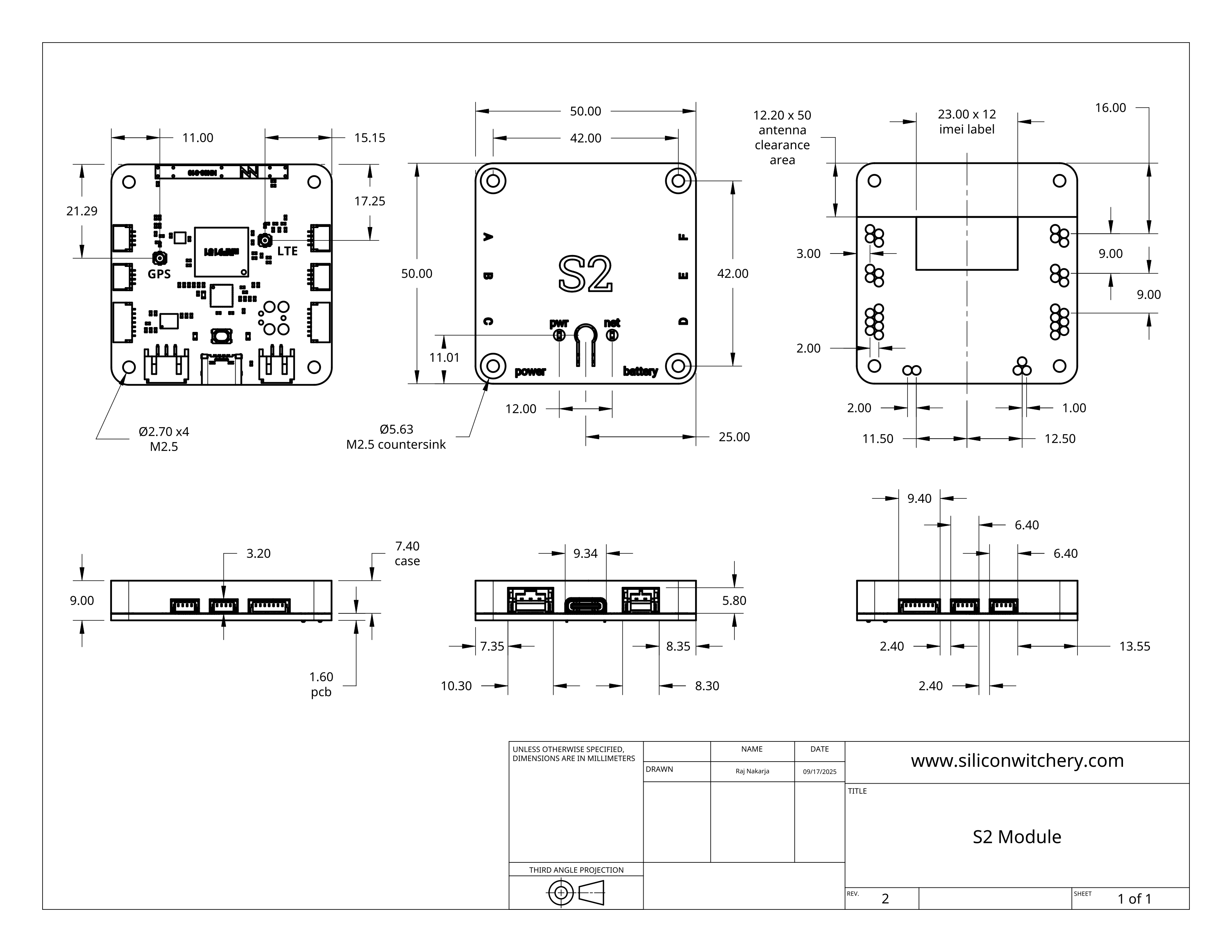
Dimensional drawings of the module are shown below.
Ordering information
The S2 Module is available in the following SKUs:
| Description | Part number | Package quantity |
|---|---|---|
| S2 Module with integrated antenna | S2-MODULE | 1 |
| S2 Module with external antenna connectors | S2-MODULE-EXT | 1 |
Compliance
Approved bands
Approved bands for the nRF9151 SiP are listed within Nordic’s documentation
Terms of purchase
The S2 Module and related software or hardware have not been approved for life-sustaining or other applications where failure may cause harm to human life, health, or damage to property or equipment. Additionally, they have not been designed according to any critical standards in order to guarantee performance or accuracy. No responsibility is assumed by Silicon Witchery for its use, nor for any infringements of patents or other rights of third parties that may result from its use. These specifications are subject to change without notice.
No liability is held by Silicon Witchery for any delay or failure in performance arising as a result of any occurrence beyond its reasonable control, including but not limited to, capacity constraints, accident, act of God, labor disputes, civil commotion, war, medical outbreak, unanticipated manufacturing problems, shortage of energy, raw materials or other supplies, requirements or acts of any government or agency thereof, including trade embargoes or medical quarantines, judicial action and/or failure or delays in transportation.
Purchasing parties agree to take responsibility that any delivered hardware, software, documentation and/or other materials, tangible or otherwise, shall not be consigned, transferred, re-exported or sold to any party or person in any way that does not adhere to the most current Export Control Regulations (“Regulations”) of the European Union Dual Use Regulations, and the Export Administration Regulations of the United States of America.
Silicon Witchery may hold back from delivering goods, services, or any other materials in its position, if it suspects they may be used outside the accordance of these Regulations.
The Purchasing Parties agree to indemnify and hold harmless Silicon Witchery against any damages, costs, losses, and/or liabilities arising out of any non-compliance with Regulations.
Let us build it for you
Silicon Witchery designs IoT devices, with LTE-M cellular and Bluetooth at its core. We take your product from the first schematic to final testing at the lab, down to the antenna, firmware and power budget. When our S1 or S2 module fits, we can build on it to save you time.
Book a free 30-minute call IoT product development services
You get a written proposal and price before any work starts.