Superstack API Reference
Superstack exposes all functionality featured in the web app as REST APIs. This allows for tight integration of Superstack with your own applications.
Use the API to pull data dynamically into your apps, expose natural language interfaces for different types of users, monitor logs from your own dashboards, manage devices alongside existing IoT infrastructure, and react to events by triggering actions on devices.
Contents
Authentication
Deployment ID
The Deployment ID is required for accessing all data within a deployment. This ID can be found on the Settings Tab:
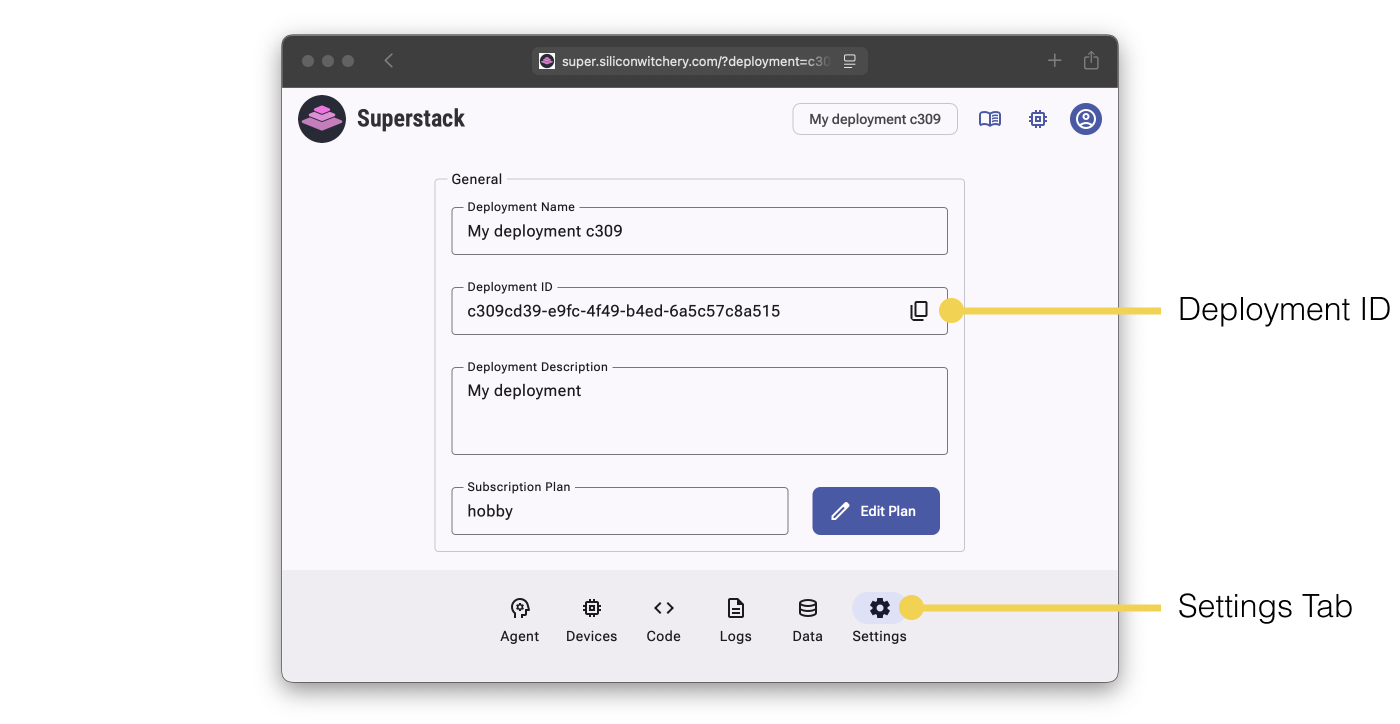
The API signatures shown below include placeholders for the Deployment ID shown as {deploymentId}. Wherever you see this, simply replace it with the real Deployment ID.
https://super.siliconwitchery.com/api/{deploymentId}/logs
# becomes
https://super.siliconwitchery.com/api/c309cd39-e9fc-4f49-b4ed-6a5c57c8a515/logs
API Key
Many of the APIs require authentication via an API Key. To generate an API Key, navigate to the API Keys section of the Settings Tab, and click Create.
Give the API Key a Name and desired Permissions. Permissions are granular, allowing specific keys to only access specific information.
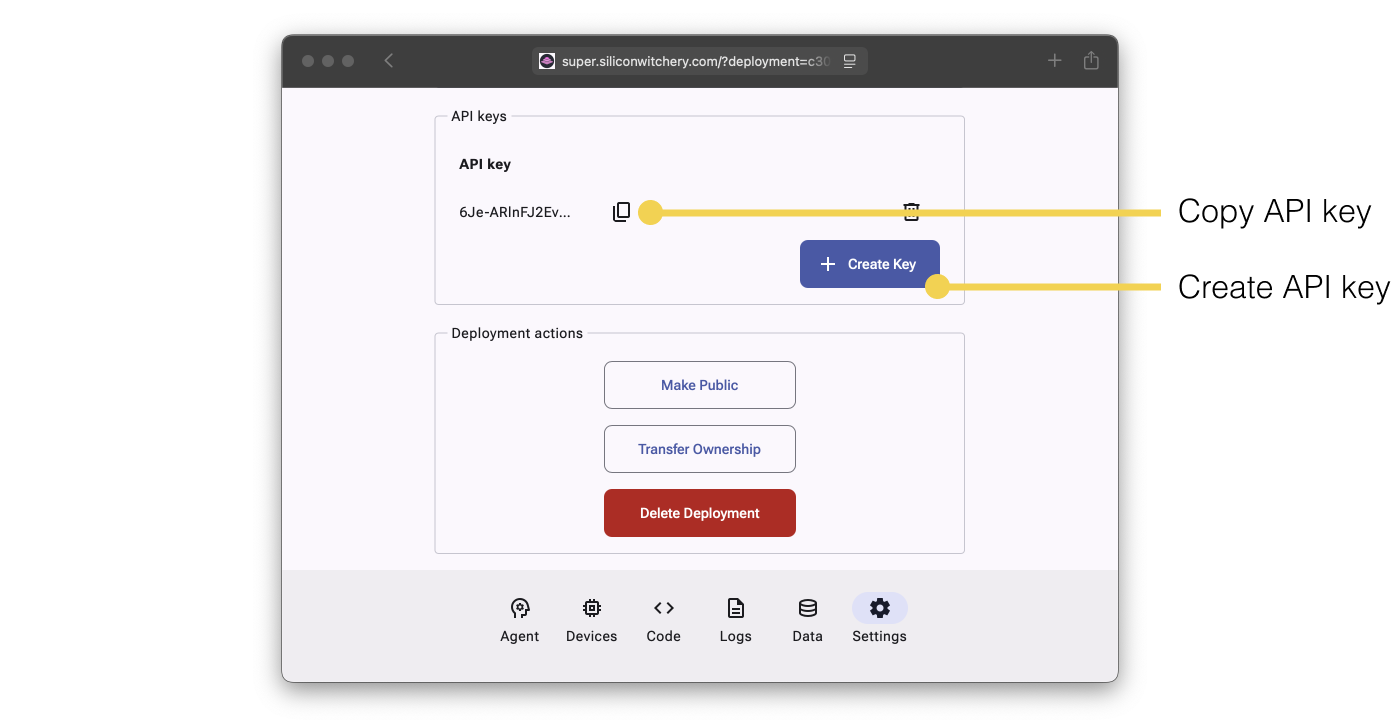
Once an API Key has been created, add it to the X-Api-Key header when making a request:
curl https://super.siliconwitchery.com/api/{deploymentId}/logs \
    -H 'X-Api-Key: <Your newly created API key>'
All deployments are private, and require an API Key with the relevant permissions. The only exception is the Demo Deployments shown when signed out, which allow read-only requests without an API Key.
Successful requests which return no data respond with {"ok": "OK"}. Failed requests respond with an appropriate HTTP status code, and an {"error": "<description>"} body.
Treat API Keys as secrets
To prevent unauthorized access to your data, keep API Keys securely stored, and do not expose keys in client-side code.
Deployments
Retrieve deployment info
GET https://super.siliconwitchery.com/api/{deploymentId}/info
Authentication & Permissions
- API key is not required for demo deployments
- API key requires read deployment info permission
Response (200 OK)
{
    "created": "2024-10-28T10:30:00Z",                                   // When deployment was created
    "name": "Greenhouse Demo",                                           // Deployment name
    "description": "A plant growth monitoring system for a greenhouse",  // Deployment description
    "plan": "Professional"                                               // Current subscription plan
}
Update deployment info
PUT https://super.siliconwitchery.com/api/{deploymentId}/info
Authentication & Permissions
- API key is required
- API key requires write deployment info permission
Request body
{
    "name": "Greenhouse Demo",                                          // Max 50 characters, cannot be blank
    "description": "A plant growth monitoring system for a greenhouse"  // Max 300 characters
}
Note: Both fields are replaced with the values given. Omitting the description clears it
Response (200 OK)
Devices
Retrieve all devices
GET https://super.siliconwitchery.com/api/{deploymentId}/devices
Authentication & Permissions
- API key is not required for demo deployments
- API key requires read devices info permission
Response (200 OK)
{
    "devices": [
        {
            "id": 1,                               // Device ID
            "name": "Tomatoes",                    // Device friendly name
            "group": "greenhouse",                 // Group the device belongs to
            "bookmarked": false,                   // True if device is bookmarked
            "online": true,                        // True if device is currently online
            "codeState": "running",                // Code state: "running", "stopped", "crashed"
            "bytesUp": 12345,                      // Bytes sent since billing period
            "bytesDown": 67890,                    // Bytes received since billing period
            "powerState": "charging",              // Power state: "discharging", "charging", "charged", "external power". null if unknown
            "batteryLevel": 85,                    // Battery level percentage. null if unknown
            "signalStrength": 75,                  // Signal strength percentage. null if unknown
            "gpsCoordinates": "(51.5074,-0.1278)"  // GPS coordinates (latitude,longitude). null if unknown
        }
    ]
}
Retrieve device groups
GET https://super.siliconwitchery.com/api/{deploymentId}/devices/groups
Authentication & Permissions
- API key is not required for demo deployments
- API key requires read devices info permission
Response (200 OK)
{
    "groups": ["greenhouse", "outside"]  // List of all device groups in the deployment
}
Retrieve online device history
GET https://super.siliconwitchery.com/api/{deploymentId}/devices/online?days=
Authentication & Permissions
- API key is not required for demo deployments
- API key requires read devices info permission
Optional query parameters
days- integer - Number of days of history to retrieve. Defaults to the current billing periodNote: History is returned in hourly intervals for periods under 14 days, otherwise daily intervals
Response (200 OK)
{
    "allowance": 100,                           // Maximum devices allowed by plan
    "devices": {
        "2024-01-15T00:00:00Z": {
            "total": 10,                        // Total number of devices at this time
            "online": 8                         // Number of online devices at this time
        },
        "2024-01-16T00:00:00Z": {
            "total": 10,
            "online": 9
        }
    }
}
Retrieve data usage
GET https://super.siliconwitchery.com/api/{deploymentId}/devices/usage?days=
Authentication & Permissions
- API key is not required for demo deployments
- API key requires read devices info permission
Optional query parameters
days- integer - Number of days of history to retrieve. Defaults to the current billing periodNote: History is returned in hourly intervals for periods under 14 days, otherwise daily intervals. When
daysis given, the totals cover the lastdaysdays rather than the billing period, andbillingDayis returned as 0
Response (200 OK)
{
    "allowance": 500000000,                     // Data allowance in bytes for billing period
    "billingDay": 23,                           // Day of month when billing period resets
    "sent": 123456,                             // Total bytes sent in billing period
    "received": 234567,                         // Total bytes received in billing period
    "total": 358023,                            // Total bytes (sent + received)
    "usage": {
        "2024-01-15T00:00:00Z": {
            "sent": 12345,                      // Bytes sent on this day
            "received": 23456,                  // Bytes received on this day
            "total": 35801                      // Total bytes on this day
        }
    }
}
Retrieve device locations
GET https://super.siliconwitchery.com/api/{deploymentId}/devices/location
Authentication & Permissions
- API key is not required for demo deployments
- API key requires read devices info permission
Response (200 OK)
{
    "locations": [
        {
            "deviceId": 1,                      // Device ID
            "latitude": 51.5074,                // Latitude coordinate
            "longitude": -0.1278                // Longitude coordinate
        }
    ]
}
Retrieve device info
GET https://super.siliconwitchery.com/api/{deploymentId}/device/{deviceId}/info
Authentication & Permissions
- API key is not required for demo deployments
- API key requires read devices info permission
Path parameters
deviceId- integer - ID of the device
Response (200 OK)
{
    "id": 1,                                    // Device ID
    "imei": "578949671258131",                  // Device IMEI
    "model": "sw-demo-device",                  // Hardware model
    "added": "2024-01-15T10:30:00Z",            // Timestamp when device was added
    "name": "Tomatoes",                         // Device friendly name
    "group": "greenhouse",                      // Group the device belongs to
    "bookmarked": false,                        // True if device is bookmarked
    "role": "I monitor Roma tomato plants...",  // AI role description
    "online": true,                             // True if device is currently online
    "uptime": 24681,                            // Device uptime in seconds
    "codeState": "running",                     // Code state: "running", "stopped", "crashed"
    "firmwareVersion": "1.0.0",                 // Current firmware version
    "storageUsed": 47293,                       // Storage used in bytes
    "storageTotal": 1048576,                    // Total storage in bytes
    "bytesUp": 12345,                           // Bytes sent since billing period
    "bytesDown": 67890,                         // Bytes received since billing period
    "powerState": "charging",                   // Power state: "discharging", "charging", "charged", "external power". null if unknown
    "batteryLevel": 85,                         // Battery level percentage. null if unknown
    "signalStrength": 75,                       // Signal strength percentage. null if unknown
    "gpsCoordinates": "(51.5074,-0.1278)"       // GPS coordinates (latitude,longitude). null if unknown
}
Update device info
PUT https://super.siliconwitchery.com/api/{deploymentId}/device/{deviceId}/info
Authentication & Permissions
- API key is required
- API key requires write devices info permission
Path parameters
deviceId- integer - ID of the device
Request body
{
    "name": "Tomatoes",           // Device friendly name (required, max 50 characters)
    "group": "greenhouse",        // Group the device belongs to (required, max 50 characters)
    "bookmarked": false,          // True to bookmark the device
    "role": "I monitor tomatoes"  // AI role description (max 2000 characters)
}
Note: All fields are replaced with the values given. Omitted optional fields are cleared
Response (200 OK)
Retrieve device telemetry
GET https://super.siliconwitchery.com/api/{deploymentId}/device/{deviceId}/telemetry?days=
Authentication & Permissions
- API key is not required for demo deployments
- API key requires read devices info permission
Path parameters
deviceId- integer - ID of the device
Optional query parameters
days- integer - Number of days of history to retrieve. Defaults to the current billing periodNote: Telemetry is returned in hourly intervals for periods under 14 days, otherwise daily intervals
Response (200 OK)
{
    "telemetry": {
        "2024-01-15T10:30:00Z": {
            "bytesSent": 1234,                    // Bytes sent at this time
            "bytesReceived": 5678,                // Bytes received at this time
            "bytesTotal": 6912,                   // Total bytes at this time
            "powerState": "charging",             // Power state at this time: "discharging", "charging", "charged", "external power". Empty if unknown
            "batteryLevel": 85,                   // Battery level percentage at this time. 0 if unknown
            "signalStrength": 75,                 // Signal strength percentage at this time. 0 if unknown
            "gpsCoordinates": "(51.5074,-0.1278)" // GPS coordinates (latitude,longitude) at this time. Empty if unknown
        }
    }
}
Add device to deployment
POST https://super.siliconwitchery.com/api/{deploymentId}/device
Authentication & Permissions
- API key is required
- API key requires add devices permission
Request body
{
    "imei": "578949671258131",    // Device IMEI (required)
    "name": "Tomatoes",           // Device friendly name (max 50 characters, defaults to the IMEI)
    "group": "greenhouse",        // Group the device belongs to (max 50 characters, defaults to "development")
    "role": "I monitor tomatoes", // AI role description (max 2000 characters)
    "bookmarked": false           // True to bookmark the device
}
Device pairing
The device must be online, and the API will wait up to 60 seconds for the button to be pressed on the device
Response (200 OK)
Remove device from deployment
DELETE https://super.siliconwitchery.com/api/{deploymentId}/device/{deviceId}
Authentication & Permissions
- API key is required
- API key requires delete devices permission
Path parameters
deviceId- integer - ID of the device
Request body
{
    "confirm": true  // Must be true to confirm deletion
}
Response (200 OK)
Code
Retrieve device code
GET https://super.siliconwitchery.com/api/{deploymentId}/device/{deviceId}/code
Authentication & Permissions
- API key is not required for demo deployments
- API key requires read code permission
Path parameters
deviceId- integer - ID of the device
Response (200 OK)
{
    "code": "-- Monitors temperature, light and soil moisture..."  // Lua code
}
Update device code
PUT https://super.siliconwitchery.com/api/{deploymentId}/device/{deviceId}/code
Authentication & Permissions
- API key is required
- API key requires write code permission
Path parameters
deviceId- integer - ID of the device
Request body
{
    "code": "-- Your Lua code here..."  // Lua code (max 100,000 characters)
}
Note: Updated code automatically starts running on the device
Response (200 OK)
Stop device code
PUT https://super.siliconwitchery.com/api/{deploymentId}/device/{deviceId}/code/stop
Authentication & Permissions
- API key is required
- API key requires write code permission
Path parameters
deviceId- integer - ID of the device
Response (200 OK)
Start device code
PUT https://super.siliconwitchery.com/api/{deploymentId}/device/{deviceId}/code/start
Authentication & Permissions
- API key is required
- API key requires write code permission
Path parameters
deviceId- integer - ID of the device
Response (200 OK)
Push code to devices
PUT https://super.siliconwitchery.com/api/{deploymentId}/code/push
Authentication & Permissions
- API key is required
- API key requires write code permission
Request body
{
    "code": "-- Your Lua code here...",      // Lua code (max 100,000 characters)
    "groups": ["greenhouse", "outside"],     // Groups to push code to
    "devices": ["Tomatoes", "Kale"]          // Specific devices to push code to
}
Note: At least one of
groupsordevicesmust be specified. Pushed code automatically starts running on the devices
Response (200 OK)
Logs
Retrieve logs
GET https://super.siliconwitchery.com/api/{deploymentId}/logs?filters=
Authentication & Permissions
- API key is not required for demo deployments
- API key requires read logs permission
Optional query parameters
filters- json string - JSON-encoded filter object{ "bookmarked": true, // Filter for logs from bookmarked devices if true "groups": ["greenhouse", "outside"], // Filter by device groups "devices": ["Tomatoes", "Kale"], // Filter by specific devices "startTime": "2024-01-15T07:00:00Z", // Start of time range (defaults to 1 hour ago) "endTime": "2024-01-15T11:30:00Z", // End of time range (defaults to now) // or "id": 41231, // Reference log ID for pagination "count": -10 // Number of logs to fetch, negative = older, positive = newer (max 1000) }Note: A time range cannot be combined with
id/count, and may return at most 1000 logs. Without time orid/countfilters, the latest 100 logs are returned
Response (200 OK)
{
    "logs": [
        {
            "id": 12345,                         // Log ID. Can be used for pagination or deletion
            "timestamp": "2024-01-15T10:30:00Z", // Timestamp the log was created
            "device": "Tomatoes",                // Device the log originated from
            "group": "greenhouse",               // Group that the device belongs to
            "message": "Log message content",    // Log content
            "level": "info"                      // Log level: "lua", "info", "error"
        }
    ],
    "newerAvailable": true,                      // True if new logs are available
    "olderAvailable": false                      // True if older logs are available
}
Delete a log
DELETE https://super.siliconwitchery.com/api/{deploymentId}/log/{logId}
Authentication & Permissions
- API key is required
- API key requires delete logs permission
Path parameters
logId- integer - The ID of the log to delete
Request body
{
    "confirm": true // Must be true to confirm deletion
}
Response (200 OK)
Data
Retrieve data
GET https://super.siliconwitchery.com/api/{deploymentId}/data?filters=
Authentication & Permissions
- API key is not required for demo deployments
- API key requires read data permission
Optional query parameters
filters- json string - JSON-encoded filter object{ "bookmarked": true, // Filter for data from bookmarked devices if true "groups": ["greenhouse", "outside"], // Filter by device groups "devices": ["Tomatoes", "Kale"], // Filter by specific devices "startTime": "2024-01-15T07:00:00Z", // Start of time range (defaults to 1 hour ago) "endTime": "2024-01-15T11:30:00Z", // End of time range (defaults to now) // or "id": 41231, // Reference data ID for pagination "count": -10 // Number of data entries to fetch, negative = older, positive = newer (max 1000) }Note: A time range cannot be combined with
id/count, and may return at most 1000 entries. Without time orid/countfilters, the latest 100 entries are returned
Response (200 OK)
{
    "data": [
        {
            "id": 12345,                         // Data ID. Can be used for pagination or deletion
            "timestamp": "2024-01-15T10:30:00Z", // Timestamp the data was created
            "device": "Tomatoes",                // Device the data originated from
            "group": "greenhouse",               // Group that the device belongs to
            "data": {                            // JSON data payload from the device
                "temperature": 23.5,
                "light": 850,
                "moisture": 45.2
            }
        }
    ],
    "newerAvailable": true,                      // True if new data is available
    "olderAvailable": false                      // True if older data is available
}
Delete a data entry
DELETE https://super.siliconwitchery.com/api/{deploymentId}/data/{dataId}
Authentication & Permissions
- API key is required
- API key requires delete data permission
Path parameters
dataId- integer - The ID of the data entry to delete
Request body
{
    "confirm": true // Must be true to confirm deletion
}
Response (200 OK)
Agents
Agents are AI assistants that answer natural language questions about the data in your deployment. Each agent has a Role describing its purpose, access to some or all Device Groups, and an optional list of Users who can chat with the agent directly over WhatsApp.
Retrieve all agents
GET https://super.siliconwitchery.com/api/{deploymentId}/agents
Authentication & Permissions
- API key is not required for demo deployments
- API key requires read agents permission
Response (200 OK)
{
    "agents": [
        {
            "id": 1,                                  // Agent ID
            "name": "Greenhouse Expert",              // Agent name
            "role": "You are an expert gardener...",  // Agent role description
            "groups": ["greenhouse"],                 // Device groups the agent can access. Empty means all groups
            "users": ["Amanda", "Bob"],               // Names of users who can chat with the agent over WhatsApp
            "usage": 12500                            // Tokens used by the agent in the current billing period
        }
    ]
}
Create an agent
POST https://super.siliconwitchery.com/api/{deploymentId}/agents
Authentication & Permissions
- API key is required
- API key requires edit agents permission
Request body
{
    "name": "Greenhouse Expert",                 // Agent name (max 50 characters, cannot be blank)
    "role": "You are an expert gardener...",     // Agent role description (max 2000 characters)
    "groups": ["greenhouse"],                    // Device groups the agent can access. Empty means all groups
    "users": [
        {
            "name": "Amanda",                    // User's name
            "phone": "+46701234567",             // User's WhatsApp number in international format
            "admin": "Raj",                      // Name of the admin. Mentioned in the introduction message
            "description": "Head gardener"       // User's role. Mentioned in the introduction message
        }
    ]
}
Note: The deployment must contain at least one device before an agent can be created
Response (200 OK)
Each user with a phone number receives an introduction message on WhatsApp, and can then chat with the agent directly from WhatsApp. WhatsApp queries count towards the same AI allowance as API queries.
Retrieve agent info
GET https://super.siliconwitchery.com/api/{deploymentId}/agent/{agentId}/info
Authentication & Permissions
- API key is not required for demo deployments
- API key requires read agents permission
Path parameters
agentId- integer - ID of the agent
Response (200 OK)
{
    "name": "Greenhouse Expert",                 // Agent name
    "role": "You are an expert gardener...",     // Agent role description
    "groups": ["greenhouse"],                    // Device groups the agent can access. Empty means all groups
    "users": [
        {
            "id": 1,                             // User ID
            "name": "Amanda",                    // User's name
            "phone": "+46701234567"              // User's WhatsApp number
        }
    ],
    "created": "2024-10-28T10:30:00Z",           // When the agent was created
    "accessed": "2024-11-02T08:12:00Z"           // When the agent was last queried. Zero timestamp if never queried
}
Update agent info
PUT https://super.siliconwitchery.com/api/{deploymentId}/agent/{agentId}/info
Authentication & Permissions
- API key is required
- API key requires edit agents permission
Path parameters
agentId- integer - ID of the agent
Request body
{
    "name": "Greenhouse Expert",                 // Agent name (max 50 characters, cannot be blank)
    "role": "You are an expert gardener...",     // Agent role description (max 2000 characters)
    "groups": ["greenhouse"],                    // Device groups the agent can access. Empty means all groups
    "users": [
        {
            "name": "Amanda",                    // User's name
            "phone": "+46701234567",             // User's WhatsApp number in international format
            "admin": "Raj",                      // Name of the admin. Mentioned in the introduction message
            "description": "Head gardener"       // User's role. Mentioned in the introduction message
        }
    ]
}
Note: All fields are replaced with the values given. The
userslist replaces the agent’s existing users, and every listed user with a phone number is sent the WhatsApp introduction message again
Response (200 OK)
Delete an agent
DELETE https://super.siliconwitchery.com/api/{deploymentId}/agent/{agentId}
Authentication & Permissions
- API key is required
- API key requires edit agents permission
Path parameters
agentId- integer - ID of the agent
Request body
{
    "confirm": true // Must be true to confirm deletion
}
Response (200 OK)
Retrieve total agent usage
GET https://super.siliconwitchery.com/api/{deploymentId}/agents/usage?days=
Authentication & Permissions
- API key is not required for demo deployments
- API key requires read agents permission
Optional query parameters
days- integer - Number of days of usage history to retrieve. Defaults to the current billing periodNote: Usage is returned in hourly intervals for periods under 14 days, otherwise daily intervals. When
daysis given,usedandremainingcover the lastdaysdays rather than the billing period, andbillingDayis returned as 0
Response (200 OK)
{
    "allowance": 50000,                          // Total token allowance for the billing period
    "used": 12500,                               // Tokens used in the current billing period
    "remaining": 37500,                          // Tokens remaining in the current billing period
    "billingDay": 23,                            // Day of month when billing resets
    "usage": {                                   // Usage breakdown across all agents
        "2024-01-15T00:00:00Z": {
            "usage": 2500                        // Tokens used at this time
        },
        "2024-01-14T00:00:00Z": {
            "usage": 3200
        }
    }
}
Retrieve agent usage
GET https://super.siliconwitchery.com/api/{deploymentId}/agent/{agentId}/usage?days=
Authentication & Permissions
- API key is not required for demo deployments
- API key requires read agents permission
Path parameters
agentId- integer - ID of the agent
Optional query parameters
days- integer - Number of days of usage history to retrieve. Defaults to the current billing periodNote: Usage is returned in hourly intervals for periods under 14 days, otherwise daily intervals
Response (200 OK)
{
    "usage": {                                   // Usage breakdown for this agent
        "2024-01-15T00:00:00Z": {
            "usage": 2500                        // Tokens used at this time
        },
        "2024-01-14T00:00:00Z": {
            "usage": 3200
        }
    }
}
Query an agent
POST https://super.siliconwitchery.com/api/{deploymentId}/agent/{agentId}/query
Authentication & Permissions
- API key is required
- API key requires query agents permission
Path parameters
agentId- integer - ID of the agent
Request body
{
    "messages": [
        {
            "role": "user",  // "user" or "assistant"
            "content": "What is the average temperature in the greenhouse?"
        }
    ]
}
Note: For follow-up questions, include the previous
userandassistantmessages before the new question
Response (200 OK)
{
    "response": "The average temperature in the greenhouse is currently 23.5°C. The Tomatoes sensor is reading 24.1°C and the Rosemary & basil sensor is reading 22.9°C.", // Natural language reply from the agent
    "answer": "23.5",                        // Raw computed answer
    "reasoning": {                           // Internal reasoning (for debugging)
        "filter": "Filtered to greenhouse devices from the last 6 hours",
        "analysis": "Calculated mean temperature from all greenhouse sensors"
    },
    "usage": 1350                            // Tokens consumed by this query
}
AI allowance
Queries return 402 Payment Required once the deployment’s AI token allowance for the billing period has been used up. The allowance is determined by the subscription plan, and resets at the start of the next billing period.